
How to create a poll in Curated
What is a poll?
A poll is a question with 2 to 4 options, each with its own photo, that friends answer with a tap. It's for a decision you'd like help with, such as which of two outfits to wear that evening. Votes are anonymous, and you're told as they arrive.
Good to know
- Nobody can see who voted for what, and results show as percentage bars as soon as anyone votes.
- Each person can vote once on a poll.
- Polls stay open until you delete them, as deleting is the only way to close one. That means you can keep collecting votes for as long as you like.
Step by step
Open the poll tab
On the home screen, go to Outfit on your mind? Share it! and tap poll.
Ask your question
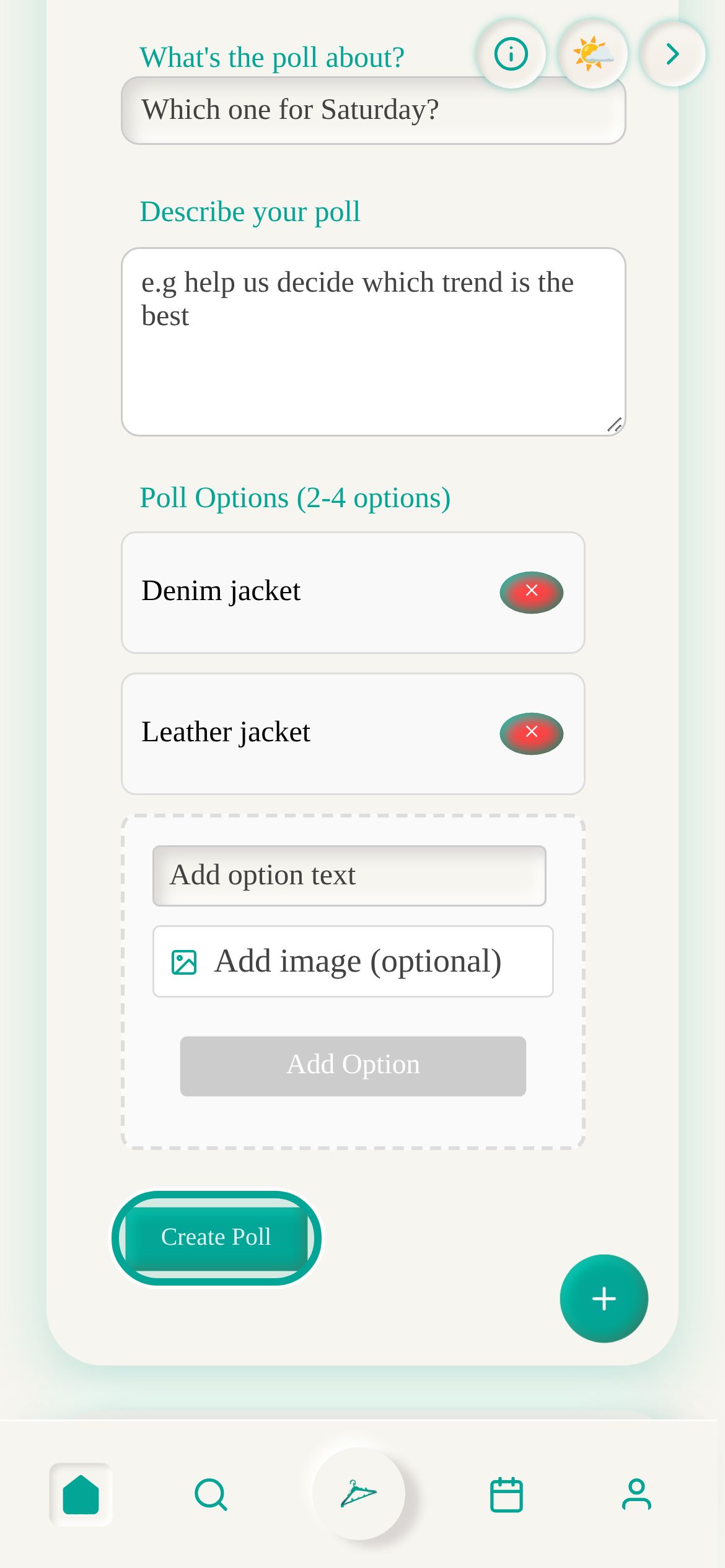
Fill in What's the poll about?, such as "Which one for Saturday?" You can add more in Describe your poll.
Add your options
Type an option in Add option text. To add a photo, tap Add image (optional) first. Then tap Add Option. Add 2 to 4 options.
Create it
Tap Create Poll. Your poll opens.
Share it
Tap the share icon on your poll to send it to friends so they can vote.

Common questions
Will I know when someone votes?
Yes. You receive a notification each time someone votes.
How do I close a poll?
Deleting it is the only way. It’s in the ⋮ menu, then delete and yes.
Why is Create Poll greyed out?
It needs a question and at least 2 options.
My option has no photo
The photo has to be chosen before you tap Add Option. The fix is to remove the option with the red × and add it again with the photo.
It says “You have already voted on this poll”
Each person can vote once, and you’ve already voted.
Checked against Curated 10.7 on 25 October 2026.